
Anime Slayer APK Download for Android (v1.5.5) – 2026
| App Name |
Anime Slayer (APK)
|
|---|---|
| Version |
v1.5.5 (Archived)
|
| OS Required |
Android 5.0+ (APK)
|
| File Size |
~13.2 MB
|
| Player |
ASD Player (Play Store)
|
| Verified Date |
Feb 27, 2026
|
| License |
Free (Freeware)
|
| Safety Status |
Verified Guide (No Hosting)
|
Looking for reliable information on Anime Slayer APK Download for Android? Because the app is not distributed through the official Google Play Store, users face broken mirrors, modified APKs, and server playback issues. This guide explains what the app does, how to verify any third-party APK source safely, and how to install it step by step on Android devices.
You will also find clear facts on iPhone & iOS compatibility, setup guides for Windows & Mac PC and Android TV, companion ASD Player configuration, and practical troubleshooting steps when servers stop responding.
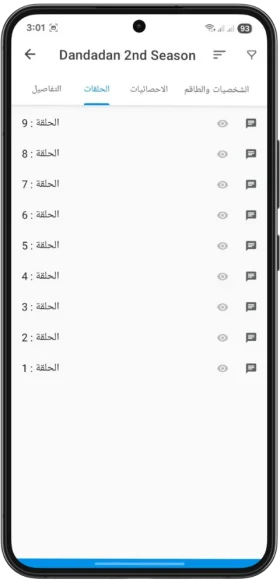
What Is Anime Slayer?
Anime Slayer is an Android companion app built around structured anime series catalogs, seasonal schedules, episode notifications, and custom watchlists, paired with external video playback through ASD Player.
Because the app is unavailable on the Play Store (read why it is not on Google Play), Android users must verify third-party APK files carefully before installing. Review our guides to spot modified or fake clones and understand the risks of unverified download mirrors.
Verified App Metadata & Release Record
Version Status & Archived Build Record
The Feb 27, 2026 snapshot recorded historical build 1.5.5 paired with companion ASD Player playback; subsequent releases remain unverified until an authoritative publisher signs them.
Key Features of Anime Slayer
Structured Anime Catalog
Organizes seasonal anime titles, movies, and OVAs by release year, status, and genre.
Release Notifications
Track weekly episode release schedules for series added to your active watchlist.
Personal Watchlists
Categorize titles into Watching, Plan to Watch, Completed, or Favorites neatly.
Multiple Quality Options
Select bandwidth-friendly SD streams or high-definition playback options when supported.
Arabic Subtitle Focus
Tailored primarily for Arabic-speaking audiences with localized synopses and season notes.
ASD Player Integration
Hands off video playback cleanly to ASD Player for hardware acceleration controls.
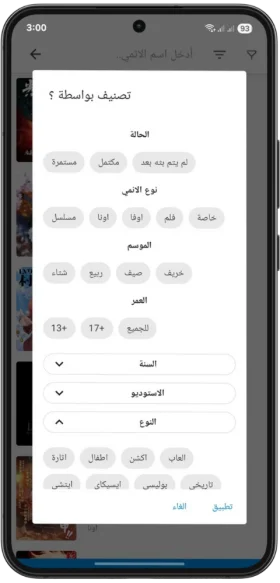
Advanced Filters & Search
Filter catalog entries quickly by release status, rating, or thematic genre tags.
Lightweight Requirements
Runs smoothly on older Android devices starting at 5.0 (check compatibility).
Detailed Episode Metadata
Inspect episode counts, story summaries, and release timelines before starting a show.
Installation & Device Compatibility
1. Installing Anime Slayer Safely on Android (APK)
v1.5.5 and legacy site screens. Treat 1.5.5 strictly as a historical reference, verify any source before downloading, and turn «Install unknown apps» back off right after setup.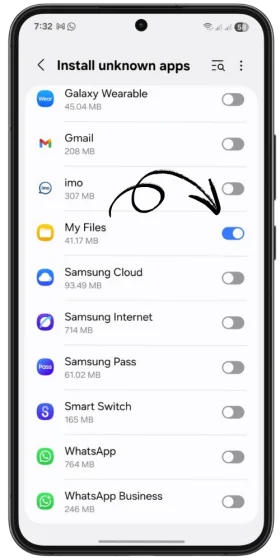
Allow Unknown Apps Temporarily
Enable Install unknown apps strictly for your browser or File Manager in Android privacy settings, never system-wide.
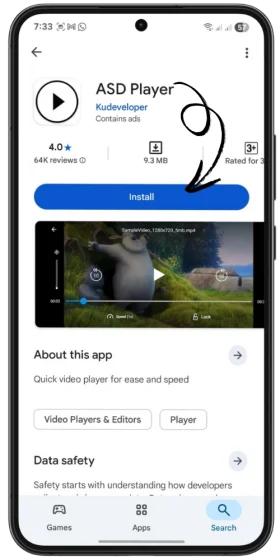
Install Companion ASD Player
Install ASD Player from Google Play before first playback so external streams launch smoothly.
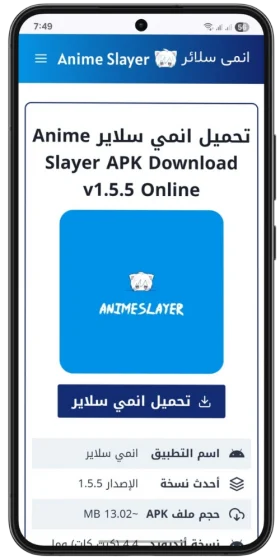
Verify Download Source (Archived UI)
Historical screen from the Feb 2026 archive displaying v1.5.5. Because this guide hosts no APK binaries, always follow our Source Safety Checklist.
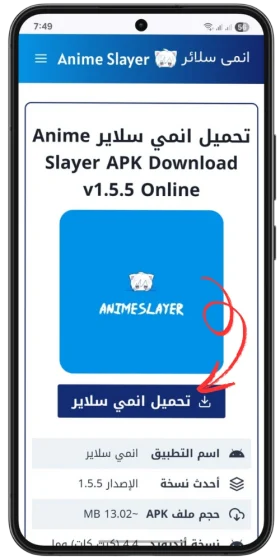
Inspect File & Extension Before Opening
Confirm the downloaded package ends in .apk and scan it with security tools before tapping to install.
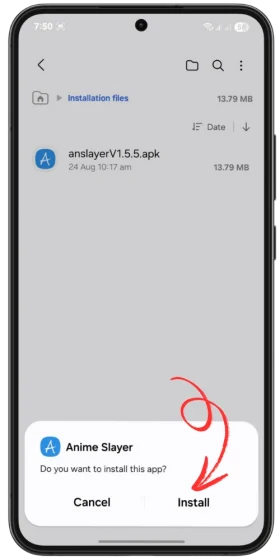
Review Installer Prompt (v1.5.5 Archive)
Tap the APK from Downloads, review requested permissions carefully, and tap Install only if permissions fit video playback.
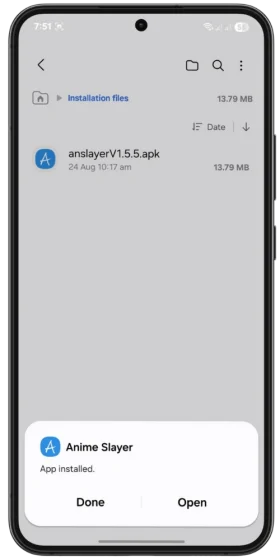
Launch App & Re-Lock Permissions
Tap Open once complete, select ASD Player when prompted, and disable «Install unknown apps» right afterward.
See also our complete Android Installation Tutorial, Safe APK Sideloading Guide, App Version Check Guide, and Archived Changelog.
2. Anime Slayer for iPhone & iPad (iOS)
Quick Device Compatibility Summary
Android Phones & Tablets
Runs via verified manual APK installation alongside ASD Player from Google Play.
Android Setup Guide →Windows & Mac PC
No native .exe installer exists; run safely inside a legitimate Android emulator.
PC Emulator Guide →iPhone & iPad (iOS)
Android APKs do not run on iOS and no official IPA exists; use safe App Store alternatives.
iPhone Alternatives Guide →Smart TV & Google TV
Works on Android TV and Google TV hardware; Samsung Tizen & LG webOS are unsupported.
Smart TV Setup Guide →Is Anime Slayer Available on iOS?
No official Anime Slayer app exists for iPhone or iPad. Android APK files cannot run on iOS devices. Be cautious of websites offering enterprise configuration profiles claiming to install Anime Slayer on iOS.
- Read full platform details in Anime Slayer for iPhone: Compatibility.
- Explore legitimate App Store options in Best Anime Apps for iPhone.
3. Anime Slayer for Android TV & Google TV
Using Android TVs and Streaming Boxes
Smart TVs running Android TV or Google TV can sideload Android packages using a file manager and navigate menus with either a D-pad remote or air-mouse toggle.
- Follow our television setup tutorial: Anime Slayer for Android TV Guide.
- Pair with a remote-friendly video player setup for smoother full-screen navigation.
4. Anime Slayer for PC (Windows / Mac) & Web Browsers
Android Emulators & Web Browser Availability
There is no native Windows/macOS executable and no verified official web streaming portal. Desktop users can either run an Android environment inside an emulator or use licensed browser streaming platforms.
- Step-by-step desktop setup: Anime Slayer for PC Guide.
- Clarifying web rumors: Anime Slayer Web Explained.
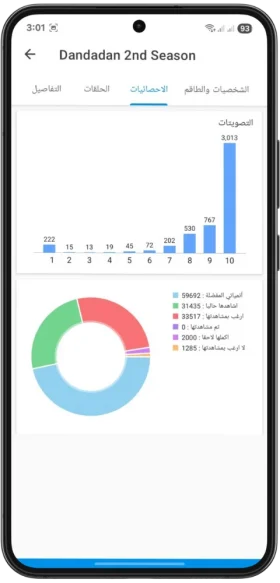
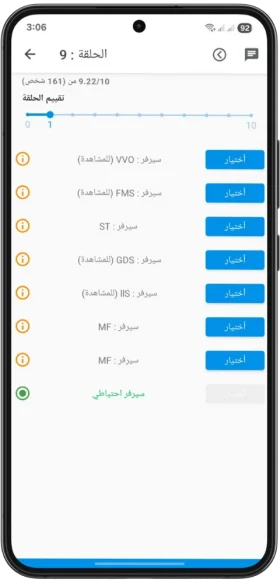
Interface Walkthrough Screens
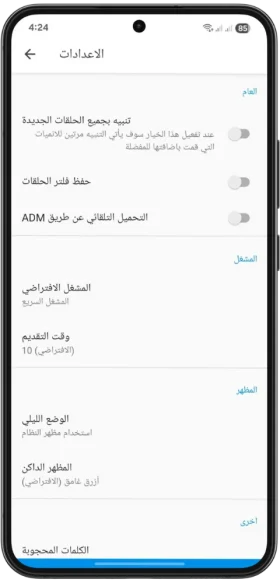
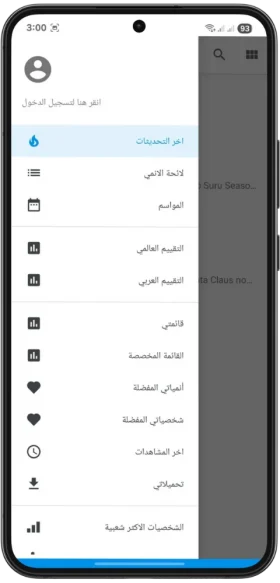
Snapshot Note: Screens below show non-poster UI components recovered from the February 27, 2026 archive (v1.5.5 era). Older screenshots are shown for interface reference only and are not presented as guarantees of a current release.
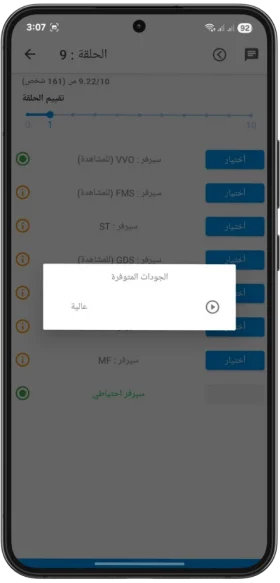
How to Use Anime Slayer & ASD Player
Essential App Settings & Troubleshooting
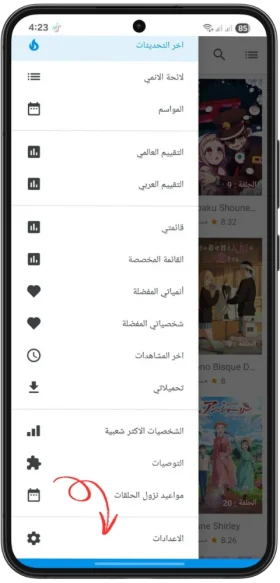
General & Display Settings
- Switch between Light Mode and Dark Mode for comfortable night reading.
- Manage notification preferences for tracked weekly episodes.
- Keep a manual backup note of your watchlist before reinstalling updates.
Playback & ASD Player Controls
- Choose default video quality tailored to your network speed.
- Toggle hardware decoding in ASD Player when audio/video desync occurs.
- Inspect ASD Player troubleshooting steps if streams freeze.
Cache Maintenance & Storage
- Clear stale temporary cache when feeds stop refreshing: Clear Cache Guide.
- Verify free internal storage before updating or caching episode artwork.
- Switch Wi-Fi/mobile networks to rule out ISP DNS blocking.
Legal Streaming Alternatives
- Compare licensed, dependable apps in Anime Slayer Alternatives.
- Read What to Use When Anime Slayer Is Down for legal platforms.
Interactive Compatibility & Troubleshooting Tools
Select Your Device to Check Real Compatibility
- Scan the APK file with security tools and inspect permissions before installing.
- Install companion ASD Player from Google Play first so external streams play reliably.
- Allow "Install unknown apps" temporarily for your File Manager and switch it off afterward.
Security note: Anime Slayer is not listed on Google Play; verify any source before installing.
Read Full Android Setup Guide- Android APK installers cannot run natively on iPhone or iPad under any setting.
- Never install unknown enterprise configuration profiles promising "1-click iOS Anime Slayer".
- Choose verified App Store anime apps or authorized browser services instead.
Important disclosure: No official native iOS build or verified IPA exists.
See iOS Compatibility & Safe Alternatives- Download an established Android emulator strictly from its vendor website with VT enabled.
- Scan the APK before importing it inside the virtual Android environment.
- Consider legitimate browser-based anime services if hardware specs are limited.
Note: Any site claiming a native Windows .exe installer for Anime Slayer is misleading.
Open PC Emulator Setup Guide- Confirm your television runs Android TV or Google TV (Samsung Tizen / LG webOS cannot run APKs).
- Transfer a verified APK cleanly via a trusted file manager and enable remote mouse toggles if needed.
- Use an external Android TV / Google TV HDMI streaming stick for closed smart TV platforms.
Note: Touch-first APK menus may require a D-pad mouse toggle on television screens.
View Smart TV & Android TV GuideSelf-Service Troubleshooting Assistant
Fix Immediate Crashes or App Failure to Launch
- Clear app Cache under Android Settings > Apps before removing user storage.
- Confirm at least 500 MB of free internal device storage is available.
- Verify Android OS compatibility (5.0+ recommended) and reboot the device.
Safety notice: Do not disable Google Play Protect permanently to force a broken APK to run.
Open Full Troubleshooting GuideResolve "App Not Installed" or Parse Errors Safely
- Remove older builds signed with a conflicting certificate before installing a new package.
- Confirm the downloaded file ended cleanly in .apk and matches your device CPU ABI.
- Turn on "Install unknown apps" temporarily for your File Manager and switch it off immediately after.
Security warning: Cancel immediately if Android alerts you or an installer asks for Contacts/SMS.
Check Full Android Install StepsFix Buffering, Mirror Errors & Video Playback Drops
- Switch streaming mirrors inside the episode list and step down resolution (SD) on slower links.
- Test alternating between Wi-Fi and mobile data or adjusting DNS settings if blocked.
- Confirm external video handoff is routed cleanly through ASD Player.
Note: Server errors often stem from upstream host downtime rather than phone settings.
Read Video Playback Troubleshooting GuideFix Companion ASD Player Crashing or Missing Audio
- Ensure ASD Player is installed from Google Play and updated to its latest store release.
- Toggle between Hardware (HW) and Software (SW) video decoding inside player settings.
- Clear cache for both apps and re-confirm ASD Player as your default video handler.
Avoid installing unverified third-party player APKs from unknown pop-up mirrors.
Open ASD Player Fix GuideResolve Black Playback Screen on Mobile or Emulator
- Clear app cache and make sure Android System WebView is updated via Google Play.
- Switch rendering mode (OpenGL / DirectX) inside desktop emulator settings if running on PC.
- Disable aggressive battery optimization restrictions temporarily during video handoff.
Never install shady "codec booster" APKs promising instant black-screen fixes.
Fix Server Errors & Blank ScreensFix Problems After Updating & Verify Release Origin
- Verify your installed build number in Android App Info before downloading another file.
- Clear app cache rather than full data first so watchlists stay intact.
- For older hardware experiencing lag, review our Older Android Devices compatibility guide.
Remember: v1.5.5 is a historical archive record; verify any newer build source cleanly.
Open Update & Version GuideTroubleshooting Center: Common Fixes
App Not Opening or Crashing
Diagnose startup freezes, APK ABI mismatches, and safe reinstallation checks on Android.
Open Not-Working Guide →ASD Player Video Handoff
Resolve companion player crashes, missing subtitles, or HW/SW hardware decoding glitches.
Fix ASD Player Issues →Buffering & Playback Drops
Switch mirrors, lower video resolution cleanly, and verify mobile vs. Wi-Fi stability.
Fix Video Playback →Server Errors & Blank Screens
Identify upstream server timeouts versus device DNS/WebView configuration errors.
Resolve Server Errors →Cache & APK Safety Checks
Safely clear temporary app storage without losing your watchlist, or verify APK signatures.
Clear Cache Safely →Latest Guides & Educational Articles
Anime Formats Explained: TV Series vs. Movies, OVA, ONA, and Specials
Learn the clear differences between Anime TV series, Movies, OVA, ONA, and Specials so you can filter watchlists accurately.
Read guide →Why Is Anime Slayer Not on Google Play?
If you search for Anime Slayer on Google Play, you will not find it. That surprises many people, because the...
Read guide →What to Use When Anime Slayer Is Down — Legal Streaming Options
When an app stops opening, stops loading a series, or simply will not play anything at all, the first question...
Read guide →Risks of Downloading Anime Slayer From Untrusted Sources
Anime Slayer is often searched for through download links rather than through an official app store. That is exactly what...
Read guide →How to Install APK Files Safely on Android
An APK file is the package Android uses to install an app. Most people install apps from the Google Play...
Read guide →
How to Identify the Original Anime Slayer App
Anime Slayer is a popular name in the world of anime apps, and that popularity has a downside. Wherever a...
Read guide →Frequently Asked Questions
Verified Answers to Common Questions
Anime Slayer is free to download. The app may show advertising, which is how many free apps support themselves. We have not verified any paid version or subscription, so treat any site that asks you to pay for the app itself with caution.
No. Anime Slayer is distributed as an APK file from third-party sources rather than through the Google Play Store. That is why installation requires allowing installs from an unknown source, and why checking the download source matters.
The current version is not verified. The only version fact we can cite is historical: version 1.5.5 was shown on the archived homepage of the old site animeslayerapk.me, captured on 27 February 2026. That is an archived record, not a verified current version.
We cannot certify any APK file as safe, and this site is not a safe or trusted download source. Any APK from outside Google Play carries risk, because the file could be modified. Work through our source-safety guide before downloading, and only install files you have checked.
No. Anime Slayer is an Android app and is not made for iPhone or iPad. If you use an iOS device, see our iPhone guide for the alternatives available to iPhone users.
There is no verified official Anime Slayer web app or browser streaming service. The app is made for Android. If you only have a browser, see our web guide, which explains the difference between the app and browser viewing and lists lawful alternatives.
The most common causes are a poor connection, an outdated version, or a temporary problem with the app’s content source. Check your connection, try another episode, and check for an update.
No. This website is independent and unofficial. It is not run by the developer of Anime Slayer and it does not host or distribute the app. It exists to provide information and guides.